When setting up a new scorecard, you will first be presented with the screen shown below. This allows you to add key details about the shoot into the system before you start plotting your shots.
Below is a description of each of the settings.
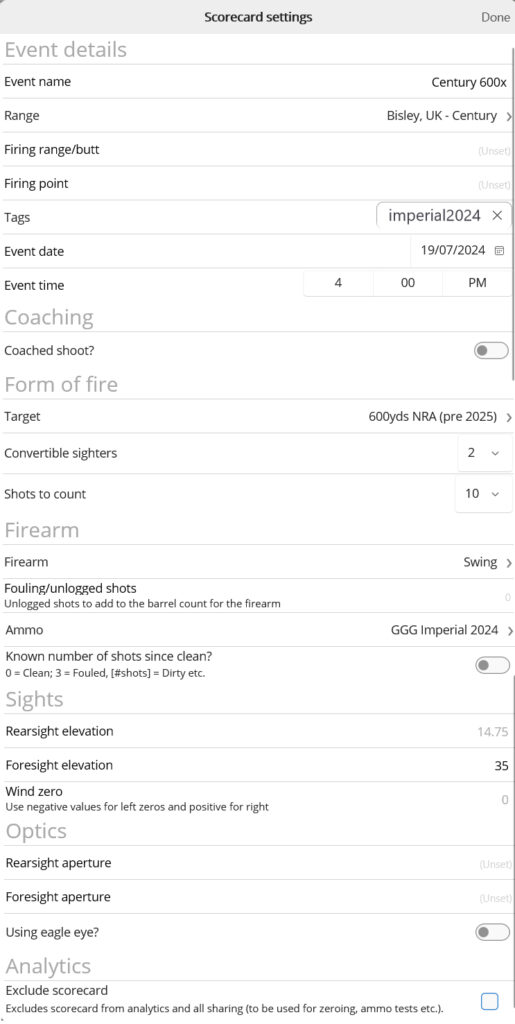
Event details
Event name – Any event name you like although try and keep these standard in case you sharing, you may wish to add the range after the name such as “Queen’s 1 300x”
Range – You can select the range that you are shooting on.
Whilst this is not required, setting a range allows automatic look-up of weather and validation of target position. Note this feature is not currently enabled, but it will be in future.
Firing range/butt and Firing point – The location on the range of your shoot.
Tags – Add any sharing tags you would like to add to the card.
Whilst you can enter your own tags, sharing tags specify whether the card can be shared with other team members or team captain. Please contact your team administrator for further details. ‘imperial2025’ will be added automatically if the shoot takes place during the Imperial.
Event date and time for your shoot. Specifying an event time will enable look-up of weather, and also allow you to filter shoots using the reporting functionality.
Coaching
Coached shoot? – Specify whether someone else was coaching you. Please note that if you were self-coached, please leave this blank.
Coach/Plotter (displayed if coached shoot) – Please specify the name of the coach and/or plotter. You will be asked to pick from a list of individuals who have signed up to the platform.
If the user has not yet signed up to Tracer, you will not see their name on the list. Please ask them to register so that you can log your shoot against that user.
Form of fire
Target – the target you are shooting on.
Sighters and shots to count – self explanatory.
Rifle settings
Firearm – You can specify customised firearms within the Your Profile tab on the main page.
Note it is possible to add a firearm as your default firearm in the Firearms page of the Profile, and also in System Preferences, also on the Profile page.
Fouling/unlogged shots – If you blew off, you may wish to add unlogged shots here, primarily for the purposes of keeping the barrel count accurate. Note it is possible to add a scorecard with no logged shots, for example if you visited the zero range.
Ammo – Please select the ammo that you are using. Note that these are system-wide, so if you require a commercially available ammunition that is not already in the system, please contact Support.
The ability to add your own custom/handloaded ammunition will be made available shortly.
Known number of shots since clean – You may wish to log the number of shots since the barrel was cleaned here. Please note this is not necessary if you have logged earlier shoots in Tracer.
Sights
Rearsight elevation – The starting elevation of the shoot. Note that it is not necessary to add a value here at this point as you can add the elevation when entering the scorecard, however if you know it, it sets up the scorecard for data entry. You cannot change this value once you’ve started entering a scorecard – please change elevations on the scorecard itself in this case.
Foresight elevation – Self explanatory.
Wind zero – The starting wind zero of the shoot. As with rearsight elevation, you can change this on the scorecard as well, so data entry here at this point is not required.
Optics
Self explanatory
Analytics
Exclude scorecard – For testing, you may wish to not include data in analysis or team sharing. Selecting this option will prevent any sharing of the scorecard, effectively keeping it private to you. By default it will also be excluded from analytics charts, although this can be overridden by including excluding scorecards on the data panel.